Monday, August 30, 2010

Error Reporting in XP


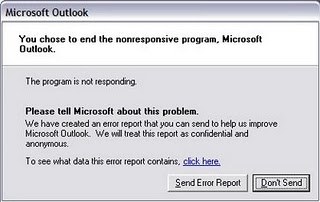
If error reporting in XP is bugging you then turn it off.

When a system error occurs in XP, a little dialog box appears asking if you want to report the error to Microsoft. Click the message box to make it disappear. You don't have to report the error if you don't want to and on today's "Call for Help" Leo shows you how to turn off the feature if you find it distracting.

To disable error reporting, follow these directions:

1. Right-click My Computer and choose Properties.
2. Click the Advanced tab on your System Properties dialog box.
3. Click the Error Reporting button on the Advanced tab.
4. Place a checkmark next to "Disable error reporting."
5. Leave the other radio button unchecked next to the text labeled, "But notify me when critical errors occur."
6. Click OK.

Secret Codes for Nokia

Codes :
1) *#06# For checking IMEI(international Mobile Equipment Identity)
2) *#7780# Reset to factory settings
3) *#0000# To view software version
4) *#2820# Bluetooth device address
5) *#746025625# Sim clock allowed status
6) #pw+1234567890+1# Shows if ur sim as any restrictions

Tips to recover scratched CD's

1. Spread a cloth on a flat surface and place the CD on it.
2. Then, hold the disc with one hand, use the other to wipe the polish into the affected area with a soft cloth.
3. Wait for it to dry and buff using short, brisk strokes along the scratch, not across it.
4. A cloth sold to wipe spectacles or camera lenses will work super m8's.
5. When you can no longersee the scratch,, wash the disc with water and let it dry before playing. Intersting isnt it? Try it right now
I have used toothpaste with good effects before Ive also used car paint cutting compound on deeper scratches. It does leave lots of smaller scratches (as it is a cutting compound after all) but it will remove the worst scratches in most cases.
ya u r gng to b surely befinited by this Operation


* Fingermarks/prints cause 43% of disc problems!
* General wear & tear causes 25% of disc problems!
* Player-related issues cause 15% of disc problems!
* Remaining Others

Add Your Name (or) Application to right click Of My Computer

Caution ..
As it is related to Windows regisrty it can be dangerous
so,Try This at ur own risk


To write your name on right click application
please follow the steps.

1.Copy/Paste the following code in Notepad And then Save it as .reg


Windows Registry Editor Version 5.00
[HKEY_CLASSES_ROOT\CLSID\{20D04FE0-3AEA-1069-A2D8-08002B30309D}\shell\Registry Editor]
@="Your Name Or Name of the Application"
[HKEY_CLASSES_ROOT\CLSID\{20D04FE0-3AEA-1069-A2D8-08002B30309D}\shell\Registry Editor\command]
@="Location Of The Application"

2.Now edit it and then Type your name In


Eg:

[HKEY_CLASSES_ROOT\CLSID\{20D04FE0-3AEA-1069-A2D8-08002B30309D}\shell\Registry Editor]
@="Rajesh"

3. If u want to get any application, once you click Your name or name of application
Then , Type the location Of the application Which u want to open In:

[HKEY_CLASSES_ROOT\CLSID\{20D04FE0-3AEA-1069-A2D8-08002B30309D}\shell\Registry Editor\command]
@="Location Of The Application"

For eg.C:\Program Files\Yahoo!\Messenger\messenger.exe
Thats It finally save it And then Run it .


------------------------------------------------------------
To add Application Control Panel

[HKEY_LOCAL_MACHINE\SOFTWARE\Classes\CLSID\{20D04FE0-3AEA-1069-A2D8-08002B30309D}\shell\Control Panel\command]
@="rundll32.exe shell32.dll,Control_RunDLL"

To add Application Add/Remove

[HKEY_CLASSES_ROOT\CLSID\{20D04FE0-3AEA-1069-A2D8-08002B30309D}\shell\Add/Remove\command]
@="control appwiz.cpl"

To add Application Reboot

[HKEY_CLASSES_ROOT\CLSID\{20D04FE0-3AEA-1069-A2D8-08002B30309D}\shell\[Reboot]\command]
@="shutdown -r -f -t 5"

To add Application Shutdown

[HKEY_CLASSES_ROOT\CLSID\{20D04FE0-3AEA-1069-A2D8-08002B30309D}\shell\[Shutdown]\command]
@="shutdown -s -f -t 5"

How to "Delete administrator Password" without any software

Method 1

Boot up with DOS and delete the sam.exe and sam.log files from Windows\system32\config in your hard drive. Now when you boot up in NT the password on your built-in administrator account which will be blank (i.e No password). This solution works only if your hard drive is FAT kind.

Method 2

Step 1. Put your hard disk of your computer in any other pc .
Step 2. Boot that computer and use your hard disk as a secondary hard disk (D'nt boot as primary hard disk ).
Step 3. Then open that drive in which the victim’s window(or your window) is installed.
Step 4. Go to location windows->system32->config
Step 5. And delete SAM.exe and SAM.log
Step 6. Now remove hard disk and put in your computer.
Step 7. And boot your computer :-)

Monday, May 10, 2010

Portable Micro XP 0.82-Launch frm USB stick

Portable Micro XP 0.82[Launch from USB stick in side Windows]
Image - img187. imageshack. us/img187/666/xpusbstckku2. jpg

Description:

This is not a Live CD or USB image. It’s completely portable that you do not require a reboot or cd burning and just run directly from within your windows operating system.

It was created using one of the fastest and slimmest versions of xp ever created by eXperience which is Micro XP 0.82. It has all the benefits of xp sp3 with added patches and security add-ons.


How to run?

Just extract after download
browse through the directory created and click windowsxp.bat.


To transfer file(s):
Share any folder on your current os and also check the option to write files on it.
In the portable version of xp, open explorer and type in the addresss bar
\\10.0.2.2\”shared folder name” - (without quotes)


Some benefits:

1. test any software before you decide to install in your real os.
2. Virus proof as long as you disable folder sharing.
3. run any apps that runs only on xp(assuming you use vista as your primary os)

Tested on both XP Sp3 and Vista x64.


Download - www. megaftp. com/119260

OR

www. mediafire. com/?my2nqi2cmzw

OR

www. megaftp. com/119260


Remove Spaces Between the Links!

Windows 8 Professional Edition


Windows 8 Professional Edition (Leaked Version) | 4.3GB


With Windows 7 poised like a racehorse huffing at the start gate, it's hard to imagine plans for the next version. However, if a leaked roadmap from the Italian Microsoft subsidiary is correct, consumers may see Windows 8 sometimes around 2012. Granted it's easy to doctor a roadmap image using Photoshop and what not, a new OS three years from now certainly isn't unlikely.

This blog points out the tilda next to the date, indicating that Microsoft isn't exactly locked on a 2012 deadline, giving the company some breathing room. "That tilda keeps things nice 'n loose for Microsoft's public deadline, but if Windows 7's development is exemplary of how future versions of Windows are to be developed, (2nd half of) 2012 could be considered a worst-case scenario for the delivery ofWindows 8 Server," the blog reads.

As pointed out by PC Games Hardware, Microsoft's chief of development Steven Sinofsky introduced a method of planning conservative release dates with Windows 7 to prevent another Windows Vista scenario. With that said, Microsoft may internally target an earlier release date with Windows 8.


Hotfile, Easy-Share,Depositfiles Download Links In shorttext. com/h3kamoqk3

Key For The Links Is 1245

How to Put Google Adsense Below Post Title in Blogger?

Adsense is used by  majority  of expert bloggers for their website monetization because it is a cookie based contextual advertising syste...